
Best Tools for Student Video Assessments in 2026: A Teacher's Guide
Introduction
Video assessments have become an essential part of modern math instruction. When students explain their thinking out loud, teachers gain insights that written work alone can't provide. But with dozens of tools available, how do you choose the right one?
In this guide, we'll compare the most effective tools for student video assessments, examining their features, pricing, and best use cases. Whether you're looking for a free option to get started or a research-based platform with AI-powered feedback, we've got you covered.
What Makes a Video Assessment Tool Effective?
Before diving into specific tools, let's establish what to look for:
1. Ease of Student Submission Students should be able to record and submit videos without creating accounts or navigating complex interfaces. The fewer barriers, the more authentic their responses.
2. Quality of Feedback The best tools help you provide meaningful feedback quickly. Some offer AI assistance, while others focus on annotation and commenting features.
3. Privacy and Compliance For K-12 classrooms, COPPA and FERPA compliance isn't optional. Ensure any tool you choose protects student data appropriately.
4. Analysis Depth Does the tool just store videos, or does it help you understand student thinking? The most effective tools go beyond storage to provide actionable insights.
5. Time Savings Video grading is time-intensive. Look for features that reduce the hours you spend reviewing without sacrificing feedback quality.
Comparing the Top Video Assessment Tools
1. Capture Thought AI
Best for: Math teachers who want research-based, AI-powered feedback on student explanations
Overview: Capture Thought AI is purpose-built for analyzing student mathematical explanations. Unlike general video tools, it uses AI to transcribe student speech and analyze their reasoning using a research-based framework developed with Dr. Drew K. Ishii (Ohio State University).
Key Features:
AI-powered transcription and analysis
Vision Analysis that reads what students write on whiteboards (not just what they say)
Research-based feedback categories: Approach, Structure, Reflection, Language, and Correctness
QR code submission links (students don't need accounts)
Authenticity detection to identify potentially AI-generated responses
COPPA and FERPA compliant with automatic video deletion
Unique Advantage: Capture Thought AI is the only tool that analyzes both what students SAY and what they WRITE. This catches discrepancies that audio-only systems miss, like when a student says "I multiplied" but their written work shows addition.
Pricing: Free tier available, premium plans for unlimited analyses
Website: capturethought.app
2. Flip (formerly Flipgrid)
Best for: General classroom video discussions across all subjects
Overview: Flip is Microsoft's free video discussion platform. It's widely used for student introductions, book talks, and collaborative discussions.
Key Features:
Free for all educators
Easy topic creation and student responses
Video replies for peer feedback
Integrates with Microsoft Teams and other LMS platforms
Limitations:
No AI analysis or transcription
Not specifically designed for math or STEM
Teachers must manually watch and grade each video
No detection of written work in videos
Pricing: Free
3. Loom
Best for: Quick video creation and asynchronous communication
Overview: Loom is a screen recording tool popular for creating instructional videos. Some teachers use it for student submissions, though it wasn't designed for assessment.
Key Features:
Easy screen and camera recording
Viewer analytics
Comments and reactions
Transcription available on paid plans
Limitations:
Designed for creators, not student assessment workflows
No rubric or grading features
Students need accounts
No educational privacy compliance built-in
Pricing: Free tier, Education plans available
4. Edpuzzle
Best for: Adding questions to existing videos
Overview: Edpuzzle lets teachers embed questions into videos students watch. It's great for flipped classrooms but focuses on consumption rather than creation.
Key Features:
Embed questions at any point in a video
Track student viewing and responses
Large library of pre-made content
LMS integrations
Limitations:
Designed for students watching videos, not creating them
Not ideal for capturing student explanations
No AI feedback on student-created content
Pricing: Free tier, Pro plans for schools
5. Snorkl
Best for: Quick feedback across multiple subjects
Overview: Snorkl offers AI-powered feedback on student videos with support for various subjects. It provides instant feedback directly to students.
Key Features:
AI-generated feedback
Multi-subject support
Student-facing feedback
Quick turnaround
Limitations:
Audio-only analysis (doesn't analyze written work shown in videos)
Generalist approach vs. math-specific depth
Different privacy model
Pricing: Subscription-based
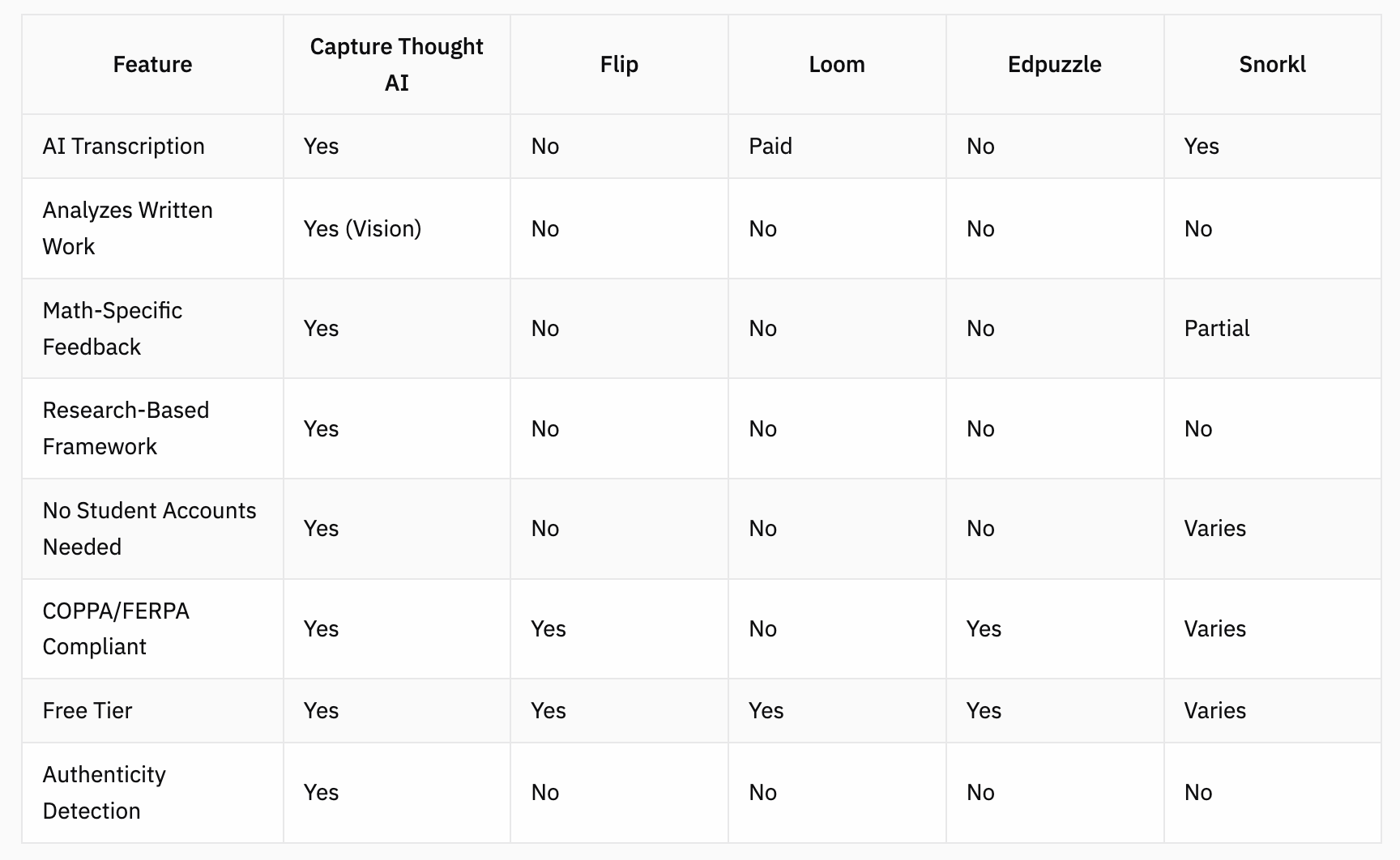
Comparison Table
Which Tool Is Right for You?
Choose Capture Thought AI if:
You teach math and want deep analysis of student reasoning
You need to see both verbal explanations AND written work
Privacy compliance is essential
You want research-based feedback categories
Time savings is a priority
Choose Flip if:
You want a free, general-purpose video discussion tool
You teach multiple subjects
You're comfortable manually grading videos
You use Microsoft products
Choose Loom if:
You primarily need to create instructional videos yourself
Student assessment is secondary to content creation
You're working with older students who can manage accounts
Choose Edpuzzle if:
You want students to interact with existing videos
Flipped classroom is your model
Student video creation isn't your focus
Choose Snorkl if:
You want AI feedback across multiple subjects
Audio-only analysis meets your needs
You prefer instant student-facing feedback
Getting Started with Video Assessments
If you're new to video assessments, here's a simple approach:
Start small: Have students record one explanation per week
Provide structure: Give clear prompts like "Explain how you solved problem #3"
Use a phone stand: Consistent video quality makes a difference (the Capture Thought phone stand positions cameras to capture students written work and keep their face off camera, letting their ideas take center stage)
Focus on thinking, not polish: Encourage authentic explanations over rehearsed performances
Frequently Asked Questions
What are effective tools for student video assessments? The most effective tools combine easy submission, quality feedback mechanisms, and time-saving features. For math specifically, Capture Thought AI offers AI-powered analysis of both verbal and written explanations. For general video discussions, Flip provides a free, user-friendly option.
Are there any AI-powered grading tools for teachers? Yes, several tools now offer AI assistance for grading. Capture Thought AI uses GPT-4o to analyze math explanations and provide scored feedback across research-based categories. The AI transcribes student speech, analyzes their reasoning, and even reads written work shown in videos.
Is Capture Thought suitable for remote or online classes? Absolutely. Capture Thought AI was designed with flexibility in mind. Students can record videos at home using any smartphone, submit via QR code links (no accounts needed), and teachers can review AI-generated feedback from anywhere. The platform works equally well for in-person, hybrid, and fully remote instruction.
How can I provide authentic assessments in my classroom? Video explanations are one of the most authentic assessment methods because they capture real-time student thinking. To ensure authenticity, Capture Thought AI includes built-in detection that flags potentially scripted or AI-generated responses by analyzing speech patterns, hesitations, and vocabulary consistency.
What are some innovative methods to engage students in learning? Having students explain their thinking on video is highly engaging because it gives them voice and agency. Research shows that the act of explaining deepens understanding. Video assessments also allow for peer learning when students view each other's explanations, creating a collaborative classroom culture.
Conclusion
The right video assessment tool depends on your subject, goals, and workflow. For math teachers seeking research-based feedback with the power of AI vision analysis, Capture Thought AI offers unique capabilities that general tools can't match. For broader classroom discussions, free tools like Flip remain solid choices.
Ready to see what AI-powered video assessment can do for your classroom? Try Capture Thought AI free and experience the difference research-based feedback makes.
About the Author: Joe DiOrio is the founder of Capture Thought AI and a former math teacher passionate about helping educators save time while improving student outcomes.
